MEPCO Bill Online Check 2026 – View & Download Duplicate Bill
To check your MEPCO bill online, type the 14-digit reference number or 10-digit consumer ID from any old bill into the checker below and press Check Bill. Your latest bill opens from the official PITC portal, where you can see the amount, due date and payment status, then print it or save it as a PDF.
Latest bills: September 2026 bills are available · Page checked on 20 October 2026
Check Your MEPCO Bill Online
Enter your Reference Number or Consumer ID and jump to your latest MEPCO bill in seconds. Simple, quick and friendly.
Opens the official PITC bill- Use the number printed on an earlier MEPCO bill — you can enter either Reference No or Consumer ID.
- Reference No is 14 digits. Enter the digits only; the spacing is added automatically for you.
- Consumer ID is 10 digits. If that number is easier to read, switch tabs and use it instead.
- Your number is used only to build the official PITC bill link in your browser. We do not need your name or CNIC.
How to Check Your MEPCO Bill in 3 Steps
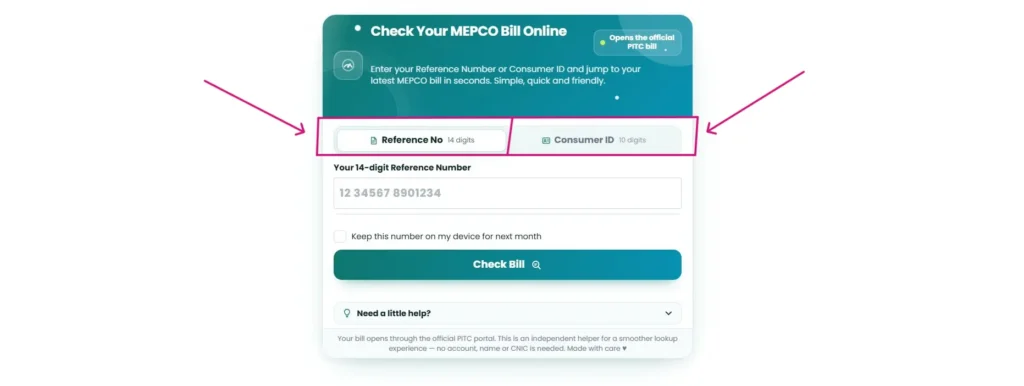
Step 1: Pick Reference No or Consumer ID
The checker opens on the Reference No tab, for the 14-digit number. If you have the 10-digit number instead, tap Consumer ID. Both open the same bill.
Step 2: Type the Number From Any Old Bill
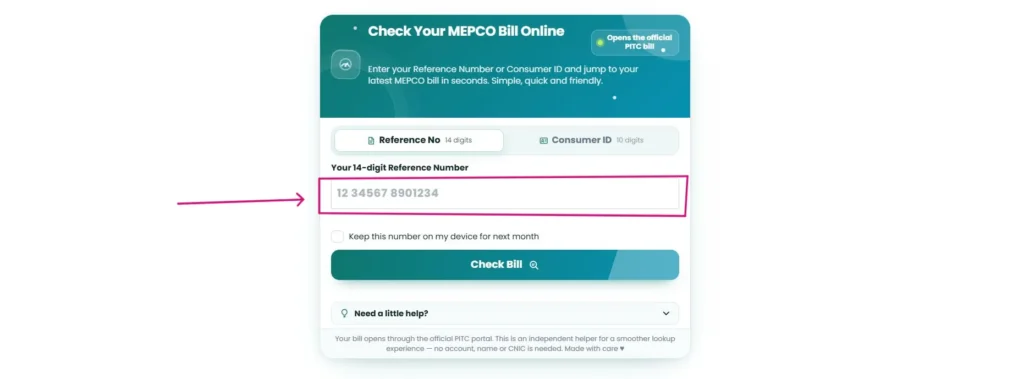
Type only the digits. The example in the box, 12 34567 8901234, shows how older bills group the reference number. If your bill shows a letter after the number, leave it out.
On your own phone or computer, tick Keep this number on my device for next month. The number stays in your browser, so next month you won’t need to type it again. Leave the box unticked on a shared or office computer.
Step 3: Press Check Bill
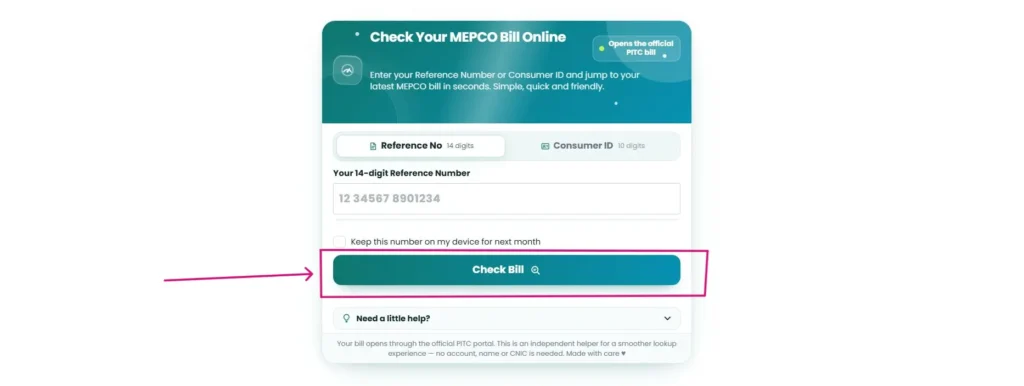
Your bill opens from the official PITC portal. If nothing appears, your browser may have blocked a pop-up. Allow it and press the button again. At the top of the bill you’ll see two tabs, Bill and Tax Certificate, and a printer icon on the right. Stuck? Open Need a little help? under the button.
اردو میں طریقہ ۱۔ ریفرنس نمبر (14 ہندسے) یا کنزیومر آئی ڈی (10 ہندسے) منتخب کریں۔ ۲۔ پرانے بل سے نمبر لکھیں، صرف ہندسے۔ ۳۔ Check Bill دبائیں۔ آپ کا تازہ بل PITC کی سرکاری ویب سائٹ سے کھل جائے گا۔ شناختی کارڈ نمبر کی ضرورت نہیں۔
Where to Find Your Reference Number and Consumer ID
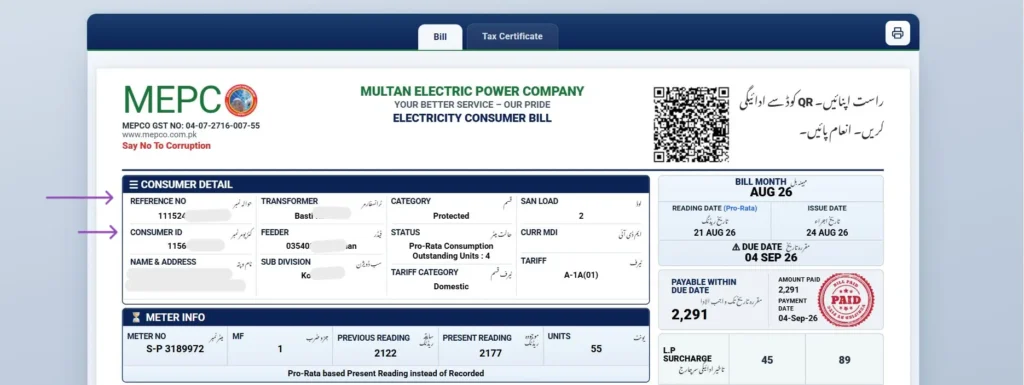
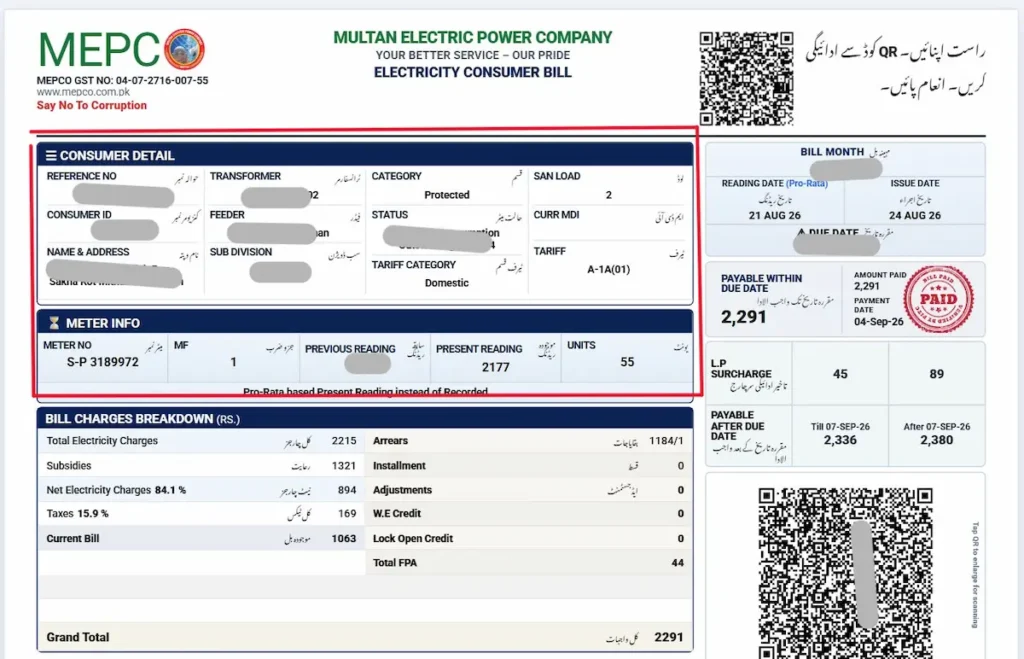
Both numbers sit in the Consumer Detail box at the top-left of your bill. Reference No is the first line, a 14-digit number. Consumer ID, a 10-digit number, is directly below it, followed by your name and address.
The same two numbers are printed again on the payment slip at the bottom of the bill, beside the barcode. Check there if the top of a paper bill is torn or faded.
Older bills use a different layout, with the numbers in rows across the top. On those, the reference number is printed in three groups of 2, 5 and 7 digits, sometimes followed by a letter. The current bill prints it as one unbroken 14-digit number.
Lost Your Reference Number? What Works Instead of CNIC
You can’t open a MEPCO bill with your CNIC. The official PITC system finds bills only by reference number or consumer ID, not by CNIC, name, phone number or meter number. Our checker never asks for your CNIC. A website that does can’t use it to fetch your bill, so don’t enter it there. Try these instead, fastest first:
- Your payment history in JazzCash, Easypaisa or your banking app, which usually shows the reference number you paid against.
- An old bill saved on your phone, in your gallery or WhatsApp chats.
- Your landlord or the previous occupant of the property.
- Your MEPCO sub-division office. Take your CNIC and the full property address.
- MEPCO directly on 0319-9757789 or rcc@mepco.com.pk, the contacts listed on MEPCO’s official website.
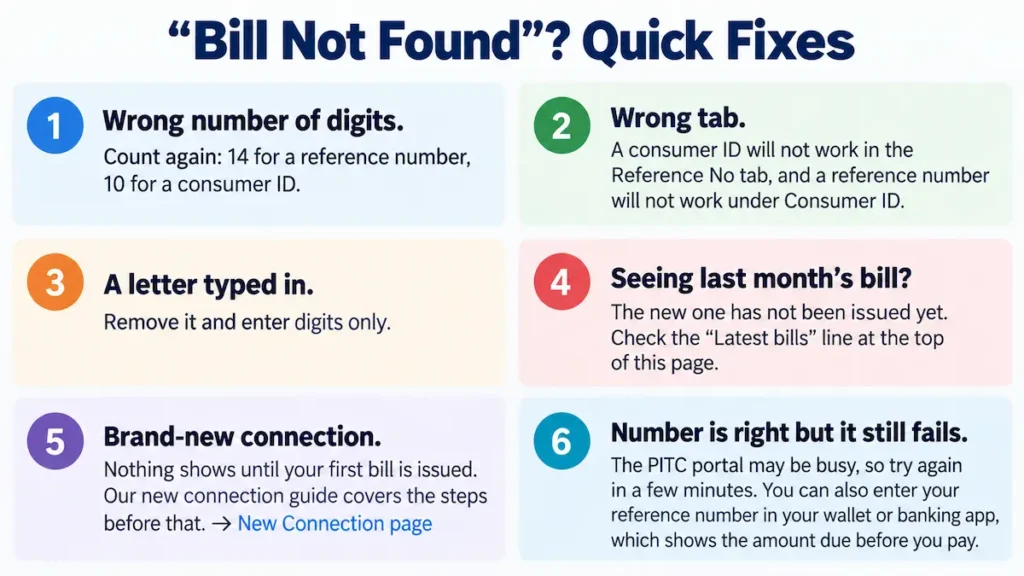
“Bill Not Found”? Quick Fixes
- Wrong number of digits. Count again: 14 for a reference number, 10 for a consumer ID.
- Wrong tab. A consumer ID won’t work in the Reference No tab, and a reference number won’t work under Consumer ID.
- A letter typed in. Remove it and enter digits only.
- Seeing last month’s bill? The new one hasn’t been issued yet. Check the “Latest bills” line at the top of this page.
- Brand-new connection. Nothing shows until your first bill is issued. Our new connection guide covers the steps before that. → New Connection page
- Number is right but it still fails. The PITC portal may be busy, so try again in a few minutes. You can also enter your reference number in your wallet or banking app, which shows the amount due before you pay.
Download or Print a Duplicate MEPCO Bill
The bill that opens online is your duplicate copy. You can print it or keep it as a PDF.
- Computer: click the printer icon at the top-right of the bill, then choose your printer or “Save as PDF.”
- Android: tap the printer icon and select “Save as PDF” as the printer.
- iPhone: tap the printer icon, then tap the share button in the print preview and choose “Save to Files.”
The bottom of the bill is the payment slip, with the barcode and a space for the bank stamp, just like the paper bill. You only need a printout to pay at a counter. Wallets and banking apps need just your reference number.
How to Pay Your MEPCO Bill
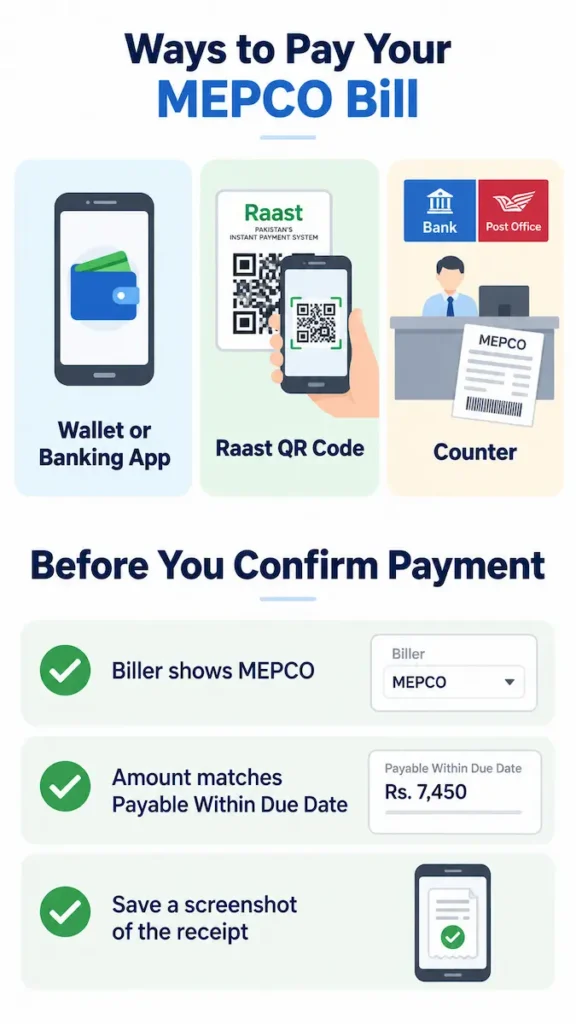
- Wallet or banking app. In JazzCash, Easypaisa, or your bank’s app, go to bill payments, choose Electricity, then MEPCO, and enter your reference number.
- Raast QR code. The top of your bill carries a QR code with an Urdu note inviting you to pay through Raast. Open the QR or Raast option in your banking app, scan the code, check the details and confirm.
- Counter. Take the printed bill to a bank branch or post office.
Before you confirm any payment, check three things:
- The biller shows MEPCO.
- The amount matches Payable Within Due Date, or the late amount if the due date has passed.
- You’ve saved a screenshot of the receipt.
Paying late? The surcharge works in two steps, explained under Bill Month, Dates and Late Payment below.
Is Your Bill Paid? How to Check
Open your bill again with the checker. Once your payment is posted, the Amount Paid and Payment Date boxes fill in, and a round PAID stamp appears beside the payable amount.
The stamp may not appear the moment you pay, so keep your receipt until it does. The payment also shows in next month’s bill history, against the month you paid.
How to Read Your MEPCO Bill, Section by Section
The current online bill is split into labelled boxes. Here’s what each one tells you, in the order they appear.
Consumer Detail
Along with your reference number, consumer ID, name and address, this box shows:
- Transformer and Feeder: the equipment and line that supply your home. You need the feeder name to look up load shedding in your area.
- Sub Division: your local MEPCO office.
- Category: whether you’re a protected consumer. See the 200-unit rule below.
- Tariff Category and Tariff: for example, Domestic with tariff A-1a, the standard residential tariff. A-1b is the residential time-of-use tariff.
- San Load: your sanctioned load, in kilowatts.
- Status: notes such as pro-rata consumption.
Bill Month, Dates and Late Payment
This box shows the Bill Month, Reading Date, Issue Date and Due Date. On the bills we reviewed, the due date came 10 to 11 days after the issue date.
The current bill lists two late amounts. If you pay in the first few days after the due date (three days on the bill we reviewed), a smaller surcharge is added. After that second cutoff date, a larger surcharge applies. The L.P. Surcharge row shows both.
Meter Info and the Meter Photo
This box shows the previous and present readings, the MF (multiplying factor, usually 1 on home meters) and your units. Units are the present reading minus the previous reading, multiplied by the MF.
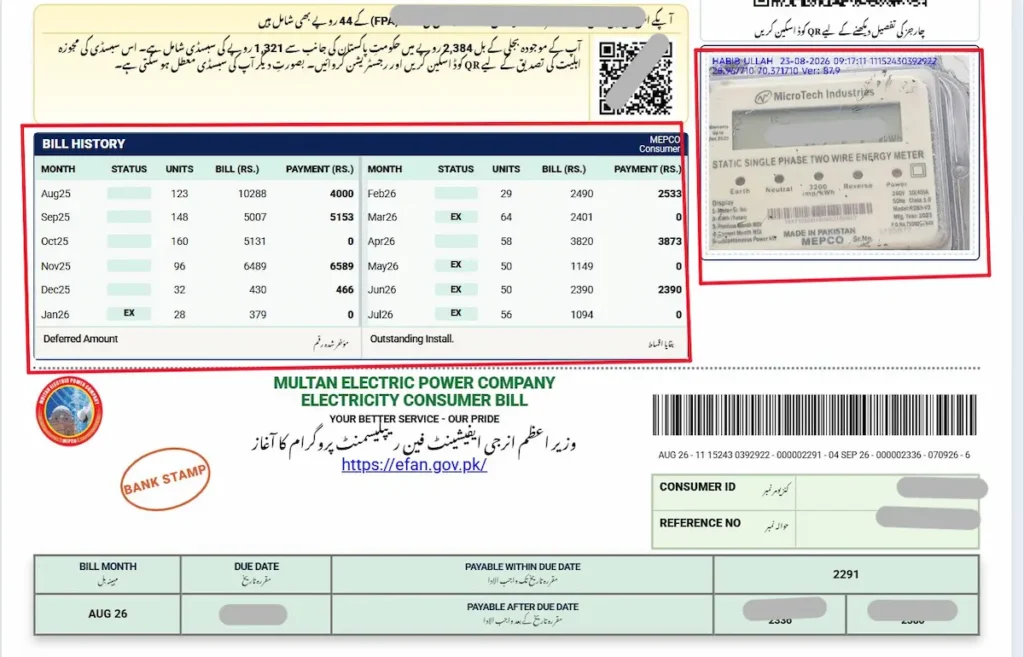
Your bill also prints a photo of your meter, stamped with the date and time it was read. Compare the digits in the photo with the Present Reading. A clear mismatch is the first sign of a billing error.
A small difference on a pro-rata bill is normal. NEPRA bills on a 30-day cycle, so when a reading is taken a day or two early or late, the units are adjusted to 30 days. The Meter Info box then notes that the present reading is pro-rata based, and the Status field shows the outstanding units carried forward.
Charges Breakdown
The current bill groups charges into Total Electricity Charges, Subsidies, Net Electricity Charges, Taxes, Arrears, Installments, and Adjustments. Net charges and taxes each show their percentage share of your current charges.
The terms people ask about most:
- FPA (fuel price adjustment): the gap between the actual and reference cost of fuel, billed two months later. July’s adjustment, for example, appears on September bills.
- QTA: the quarterly tariff adjustment, spread across three monthly bills.
- FC surcharge: the financing cost surcharge.
- GST and income tax: income tax may be withheld on larger bills, depending on your tax filer status.
- Charges that no longer apply: the PTV fee was abolished from 1 July 2025, and electricity duty is no longer collected through household bills. If either still appears on a domestic bill, file a complaint.
The 12-Month Bill History
This grid lists the last 12 months, each with its status, units, bill amount and payment. Deferred Amount and Outstanding Installments appear underneath. Some months show short status codes, such as EX. Your sub-division office can tell you what a code means for your account. To compare months in detail, use our bill history tool.
Notices, QR Codes and the Tax Certificate
- Subsidy notice: if the government subsidises your bill, an Urdu notice states the subsidy amount and asks you to scan the QR code beside it to register. The Power Division says this registration keeps relief going for eligible low-consumption households and is not a withdrawal of the subsidy. The notice warns that the subsidy may be suspended if you don’t register. The code opens the official portal, where you enter your reference number and CNIC and confirm with a one-time password. This is the only place your CNIC is needed, and only through the QR code on your own bill.
- Fan replacement notice: the bill promotes the Prime Minister’s energy-efficient fan replacement programme at efan.gov.pk.
- Tax Certificate tab: on the online bill, the tab beside Bill opens the tax certificate for your connection. Keep a copy if you file income tax returns.
What Changed on MEPCO Bills This Month
Updated 12 September 2026 from NEPRA’s decisions for the September billing cycle.
September bills carry two increases approved by NEPRA:
- Fuel adjustment: Rs2.0581 per unit for electricity used in July 2026. It applies to all consumers except lifeline users, EV charging stations and prepaid-tariff consumers. Units billed under the Incremental Consumption Package are also charged.
- Quarterly adjustment: Rs0.5194 per unit, added to September, October and November bills. Lifeline users, Incremental Consumption Package units and prepaid consumers are exempt.
If your September bill was issued before NEPRA’s notification, the fuel adjustment may appear on next month’s bill instead.
What the two adjustments add, before GST:
| Units used | Fuel adjustment | Quarterly adjustment | Total extra |
|---|---|---|---|
| 100 | Rs205.81 | Rs51.94 | Rs257.75 |
| 200 | Rs411.62 | Rs103.88 | Rs515.50 |
| 300 | Rs617.43 | Rs155.82 | Rs773.25 |
Source: NEPRA’s fuel charges adjustment decision for July 2026, as reported by Dawn.
Protected or Not: Why 200 Units Matter
Your status is printed in the Category field of the Consumer Detail box. It affects your per-unit rate more than anything else on the bill.
A home is protected if it used 200 units or less every month for the past six months. One month above 200 ends that. You then pay non-protected rates, and you get protected status back only after six straight months at 200 or below.
Lifeline is a smaller group: single-phase connections with a sanctioned load up to 1 kW, where neither the current month nor any of the last 12 months went above 100 units.
Summer is when most homes cross the line, because air conditioners push usage past 200. Around mid-month, subtract the Present Reading on your last bill from the reading on your meter today. If you’re already near 100 units, cut back. See how close you are with the calculator.
Wrong Reading or Overbilling? How to Get It Fixed
First, check the bill yourself. Compare the meter photo with the Present Reading, then work out your units: present reading minus previous reading, times MF. Confirm your Category and Tariff are right, and that the Arrears don’t include a payment you already made.
Then complain through any of these:
- CCMS portal at ccms.pitc.com.pk, the complaint system linked from MEPCO’s own website.
- Call 118 or SMS 8118, the complaint numbers printed on MEPCO bills.
- Your sub-division office. Take your bill, a photo of the meter you took yourself, and your payment receipts.
Write down your complaint number every time.
Not fixed? Escalate. Once you’ve complained to MEPCO, you can file with NEPRA’s online complaint system. The Federal Ombudsman (Wafaqi Mohtasib) also takes complaints free of charge.
Detection bills are charged separately from your monthly bill. If you dispute one, NEPRA’s Consumer Service Manual gives you the right to appeal to MEPCO’s review committee, headed by the next higher officer, and to a personal hearing.
MEPCO Peak Hours (Only for ToU Meters)
| Months | Peak hours |
|---|---|
| December to February | 5 PM to 9 PM |
| March to May | 6 PM to 10 PM |
| June to August | 7 PM to 11 PM |
| September to November | 6 PM to 10 PM |
Each peak window lasts four hours, and the remaining 20 hours are off-peak. Peak rates apply only to time-of-use (ToU) connections, which for homes means tariff A-1b, used for a sanctioned load of 5 kW or more. A standard home meter pays the same rate at any hour, so for most households, using fewer units overall is what lowers the bill.
Check Without a Browser: App, Wallets and SMS
- MEPCO app: MEPCO’s website has an “Our App” page for its official app, which offers a bill estimator, power complaints, load-shedding alerts and consumption tracking. Install it only through that page, never as an APK file from another website.
- Wallet or banking app: enter your reference number under electricity bill payments to see the amount due, without paying or printing anything.
- SMS: websites list different SMS codes for bill enquiries, so we don’t recommend one. The SMS number printed on MEPCO bills, 8118, is for complaints.
Areas Served and How to Contact MEPCO
The checker opens the bill for any MEPCO connection, in Multan or anywhere else MEPCO supplies.
13 districts: Multan, Khanewal, Vehari, Sahiwal, Pakpattan, Bahawalnagar, Bahawalpur, Lodhran, Rahim Yar Khan, Dera Ghazi Khan, Rajanpur, Muzaffargarh and Layyah.
9 operation circles: Multan, Khanewal, Vehari, Sahiwal, Bahawalnagar, Bahawalpur, Rahim Yar Khan, Dera Ghazi Khan and Muzaffargarh.
| Contact | Details | Use it for | Where it’s published |
|---|---|---|---|
| MEPCO | 0319-9757789 · rcc@mepco.com.pk | General queries and complaints | mepco.com.pk (checked 12 Sep 2026) |
| Complaint line | 118 (call) · 8118 (SMS) | Faults and billing complaints | Printed on MEPCO bills |
| CCMS | ccms.pitc.com.pk | Online complaints | Linked from mepco.com.pk |
| Your local office | SDO and XEN phone numbers | Area faults and office visits | Printed on MEPCO paper bills |
Load shedding: find your feeder name in the Consumer Detail box, then look it up on the feeder-wise schedule linked from MEPCO’s website.
Who Runs This Website and How We Check It
This is an independent website. We have no connection to MEPCO, PITC, WAPDA or NEPRA, and we don’t issue bills or take payments. When you press Check Bill, your bill opens from the official PITC portal. The checker never asks for your name or CNIC, and the saved-number option keeps your number on your own device.
Every figure across the site comes from NEPRA decisions, MEPCO’s official website, government announcements or real MEPCO bills we’ve reviewed, with personal details removed. Adjustment figures are updated each billing cycle, with the date shown on the page. If you spot an error, tell us through our contact page and we’ll correct it.
Frequently Asked Questions
Can I check my MEPCO bill with my CNIC or meter number?
No. The official system opens bills only with the 14-digit reference number or 10-digit consumer ID. If you’ve lost both, see what works instead of CNIC.
Can I see my old MEPCO bills?
Your current bill already shows the last 12 months of units, amounts and payments in its history grid. For anything older, check your own saved bills or ask your sub-division office.
Will a bank accept the bill I print from here?
The copy that opens is the PITC bill, with the same barcode and payment slip as your paper bill. If a counter still hesitates, pay by wallet or banking app, which needs only your reference number.
When does the new MEPCO bill come out each month?
After your meter is read. The issue date follows a few days later, and on the bills we reviewed, the due date came 10 to 11 days after issue. The “Latest bills” line at the top of this page shows the newest bill month available.
Why does my bill say “Pro-Rata”?
NEPRA bills on a 30-day cycle. If your meter was read earlier or later than that, your units are adjusted to 30 days, and the difference carries into your next bill. It’s a normal adjustment, not a billing error in itself.
What happens if I pay after the due date?
A late payment surcharge is added. The current bill shows two late amounts: a smaller one for the first few days after the due date and a larger one after that. An unpaid bill carries into next month as arrears.
Can I check the bill for my parents’ home or a rented property?
Yes. Anyone with the reference number or consumer ID can open that connection’s bill, so you can check or pay a family member’s bill from anywhere. The same applies to your own bill, which shows your name and address, so share your reference number only with people you trust.